
The HL7 Utility Toolbox is a comprehensive desktop application designed for healthcare IT professionals, interface analysts, developers, and support staff who work with HL7 messaging. Built with a modern interface, this tool offers a suite of features to simplify the creation, testing, analysis, and transmission of HL7 messages.
Core Capabilities & Marketing Overview:
- Efficient HL7 Message Handling:
- Intuitive Editor: A user-friendly text area allows for easy input, pasting, and modification of HL7 messages.
- Clipboard Integration: Quickly paste HL7 messages from the clipboard directly into the application for immediate analysis or transmission.
- In-depth HL7 Analysis & Understanding:
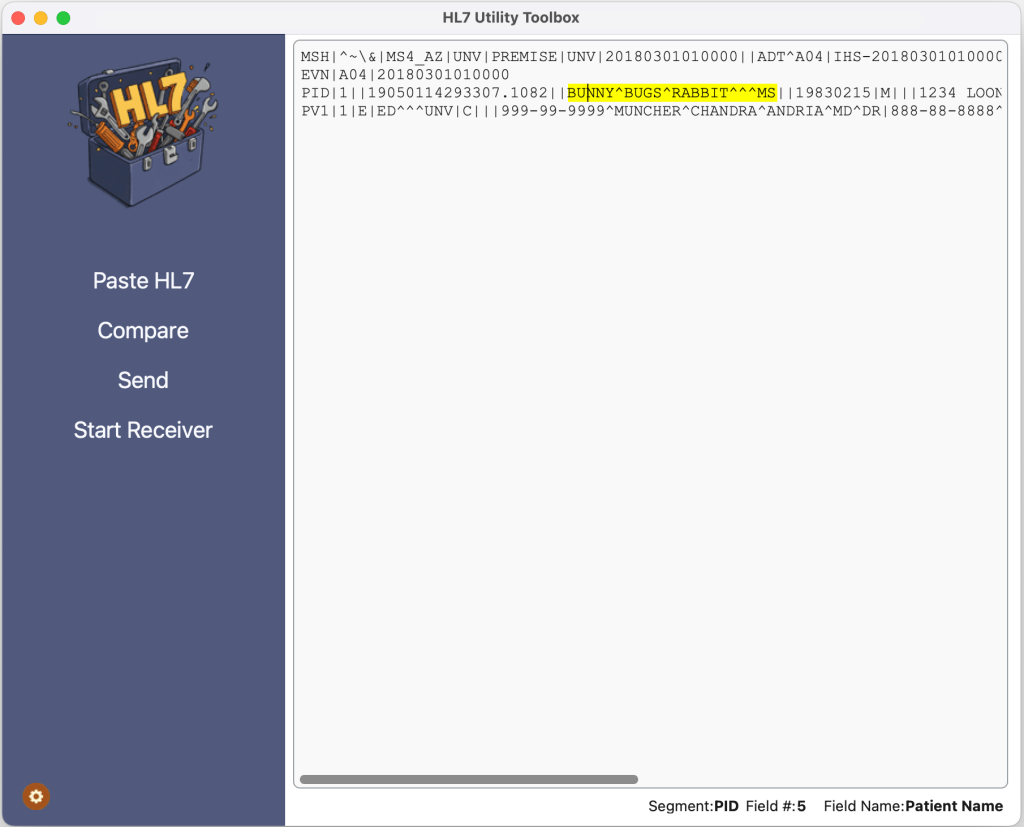
- Real-time Field Inspection: As you navigate through an HL7 message in the editor, the application dynamically displays the segment name, field number, and a descriptive field name (e.g., MSH-9 for Message Type, PID-5 for Patient Name). This provides instant context and aids in understanding message structure.
- Field Highlighting: The currently selected HL7 field is highlighted within the message editor, making it easy to visually locate the data you are inspecting.
- Comprehensive HL7 Dictionary: Includes definitions for common HL7 segments (MSH, PID, PV1, ORC, OBR, OBX, NK1) and their respective fields, facilitating accurate message interpretation.
- Robust HL7 Communication & Testing:
- Built-in MLLP Sender: Send HL7 messages over MLLP (Minimal Lower Layer Protocol) to a specified IP address and port. This is crucial for testing interfaces and integrations with other healthcare systems.
- Integrated MLLP Receiver: Start an MLLP listener on a configurable port to receive incoming HL7 messages. Received messages are displayed within the application, allowing for real-time monitoring and verification of message transmission.
- Configurable Network Settings: Easily configure the listener port for receiving messages and the destination IP address and port for sending messages through a dedicated configuration dialog.
- Advanced HL7 Comparison:
- Side-by-Side Message Comparison: Features a dedicated “Compare Window” to analyze differences between two HL7 messages. This is invaluable for troubleshooting, identifying discrepancies, or verifying message transformations.
 Medical Information IT Tools