
Streamline Your Medical Imaging Workflow with DMWL Client
The DMWL Client is a desktop application designed to simplify and enhance the process of accessing and managing DICOM Modality Worklists (MWL). This tool is ideal for healthcare IT professionals, PACS administrators, radiology department staff, and medical imaging software developers or integrators looking for an efficient way to connect to and query MWL servers.
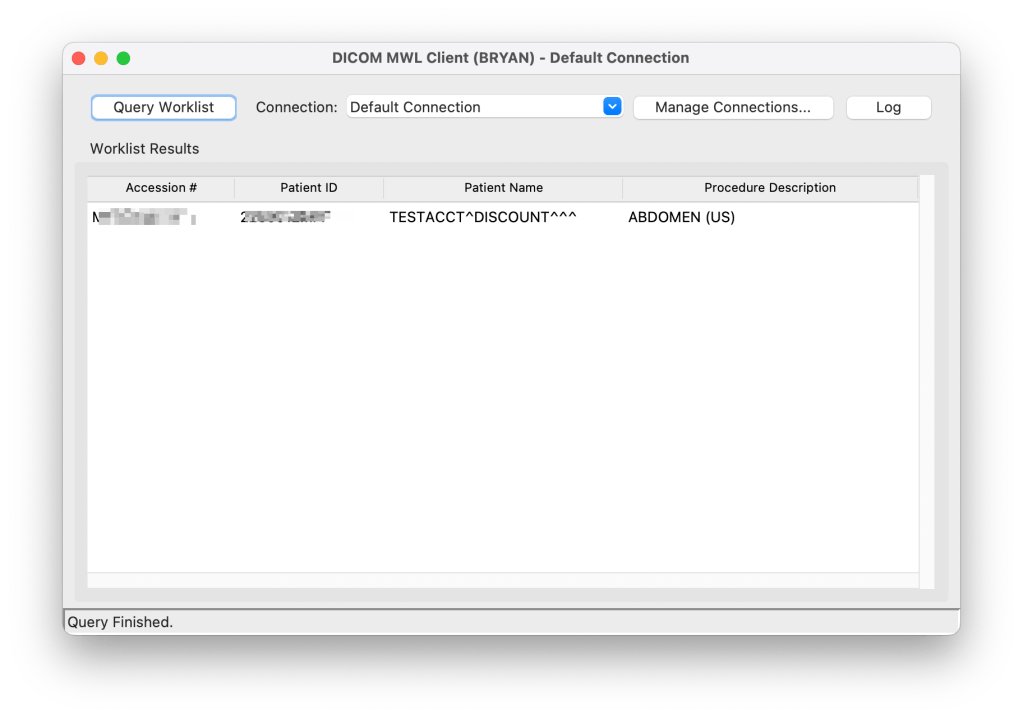
Key Benefits & Features:
- Simplified Workflow: Easily query and retrieve crucial patient examination information from your PACS or other Modality Worklist SCP. This helps organize and manage imaging schedules effectively.
- Flexible Connectivity & Configuration:
- Manage Multiple Servers: Save, manage, and effortlessly switch between various server connection profiles, each with its own Client AET, Server AET, IP address, and port settings.
- Persistent Settings: Configurations are conveniently stored in a local JSON file allowing for easy backup and transfer of settings. The application intelligently stores this configuration in standard user application data directories across Windows, macOS, and Linux systems.
- Intuitive User Interface:
- Clear Results Display: Worklist items are presented in an organized table format, showing key details like Accession Number, Patient ID, Patient Name, and Procedure Description.
- Detailed Information Access: Double-click any worklist entry to view the complete DICOM dataset in a dedicated pop-up window.
- Troubleshooting Made Easy: A built-in log window displays detailed communication information with the DICOM server, aiding in diagnosing and resolving connectivity or query issues.
- Efficient Querying Capabilities:
- Date-Based Queries: Retrieve worklists for specific dates using a configurable query date offset (e.g., today, tomorrow, yesterday).
- Comprehensive Search: The application constructs detailed DICOM queries, including parameters such as Patient Name, Patient ID, Scheduled Procedure Step Start Date, and Accession Number, to fetch relevant worklist entries.
- Robust DICOM Communication:
- Syntax Support: Supports common DICOM transfer syntaxes, including Implicit VR Little Endian and Explicit VR Little Endian.
- Secure Connection Handling: Properly manages DICOM association establishment, C-FIND requests for querying, and association release.
- Error Management: Provides informative status messages and handles various connection errors, such as connection refused, timeouts, and other network or OS-level issues.
 Medical Information IT Tools